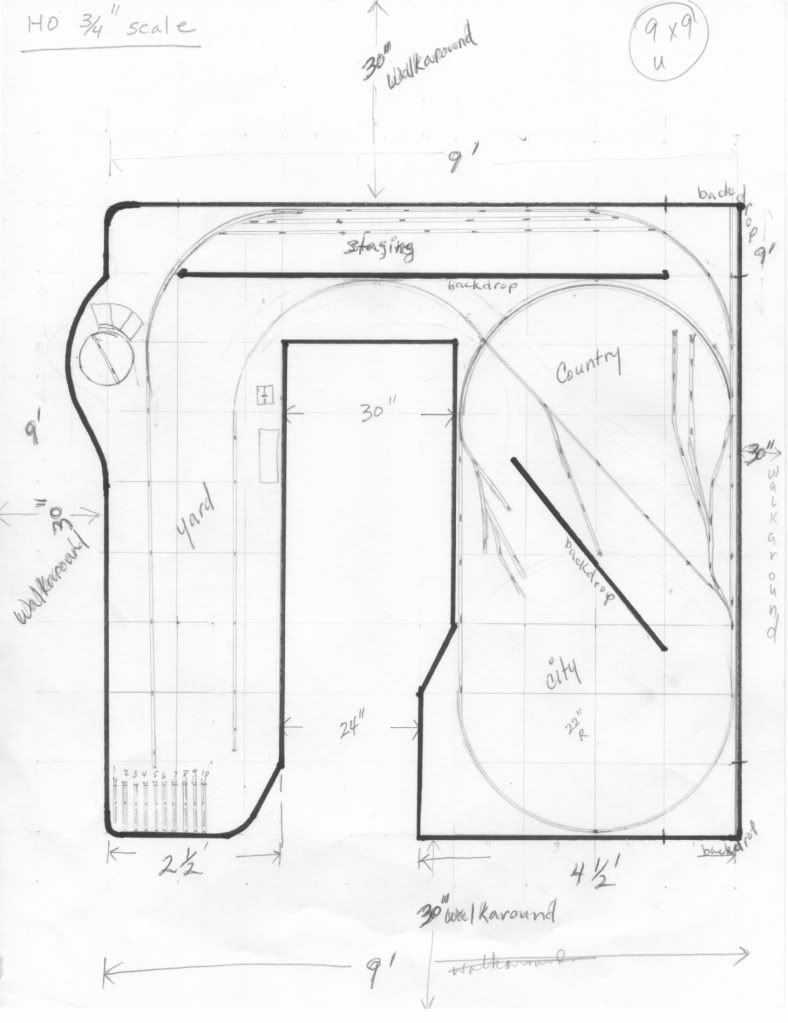
Second attempt. More to follow as I get better at drawing to scale. HO at 3/4" scale.
-Ron
Second attempt. More to follow as I get better at drawing to scale. HO at 3/4" scale.
-Ron
-RC
Is that a Traverser you’ve got planned on left side? What is your concept??
Stein!
I didn’t know that the Vermont Rail System had a yard a Burlington yard in New Hampshire [}:)]
Assuming you are joining your tracks in your yard, you have a good concept going. The yard definitely overpowers your switching options though. Perhaps if you toned down the yard to 3-4 tracks and used the rest of the space for more industrial switching you would find a better balance.
Great idea on the staging. The more the better.
Didn’t get the memo, eh ? To save on costs in Congress, they are cutting down on the number of number of states and the number of senators. Minnesota is working on one scheme - providing one senator for the cost of two, and VT and NH will try merging and have 1 senator from each half of New Hampmont [:D]
Nah - just typing faster than my brain can think sometimes - let’s adjust it to Burlington, VT.
Grin,
Stein
deleted
Roundhouse with turntable.
I wanted to see if i could set this yard up like a stub end of a branch line were there would a couple of stalls, a team or RIP track, a sanding tower, a repair shop, things like that - plus some room to sort and classify. Maybe a couple of small industries.
Just learning how to draw this stuff so I don’t think I am too to scale here, but evolving.
-Ron
I like the idea of developing switching opportunities. Still learning how to draw these things. I’m glad this drawing gave everyone a better idea at what I am TRYING to shoot for. Having fun!
I’m going to look into some other CAD programs. Not too fond of the Atlas track plan drawing.
-Ron
Hi Stein,
What are the drawing programs used?
Thanks,
-Ron
Quite a few different ones. Like with the choice of operating system for your computer, a lot comes down to what you like and what you feel comfortable with.
For Windows, I like XtrakCad - a freeware program which can be downloaded from (http://www.xtrkcad.org/Wikka/HomePage) - it does what I want, and the investment in time on how to use it well has been repaid in flexibility since I have used it on a large number of track plans - my current layout is on revision 43 of it’s track plan, I think, and I have designed/drawn quite a few other track plans as well - probably more than 100 different or modified plans over the last couple of years.
Some other people around here doesn’t like XtrakCad’s user interface, and swears by a program called AnyRail (http://www.anyrail.com/buy_en.html), which costs $55 (IMO, still not very much, compared with the total cost of this hobby).
You had already tried the Atlas track planning program - it is free, but limited to using Atlas tracks - and you didn’t care for it.
There are quite a few other programs as well, but I’ll leave it to people familiar with those to give you recommendations on those.
And of course - you can use pretty much any vector based drawing program (vector based - a line or a curve is an “object” which can be selected, adjusted, moved or deleted) to draw layout plans. It doesn’t have to be a dedicated track planning program.
Or draw on paper, or just layout out turnouts and pieces of flex track on the floor or on a temporary piece of benchwork made from scrap cardboard mounted on sawhorses or whatever.
The relatively low tech solution of buying one turnout in every size (small, medium, large, curved), putting it on a xerox machine and making paper cutouts also work
Touche! Or is that Two Shays? [:D]
As if the current legislative systems weren’t screwed up enough on their own [:-^]
Stein said: The relatively low-tech solution of buying one turnout in every size (small, medium, large, curved), putting it on a xerox machine and making paper cutouts also work.
If you do this, just be very careful about lining up the paper track pieces so the junctions are truly straight across. It’s real easy to cheat a little bit, even unintentionally, and introduce kinks which will let you fit in more track, but when you go to build, your plan won’t fit - or even worse, if you build in the kinks to make it fit, your trains won’t stay on the tracks.
I won’t say “ask me how I know” because I haven’t actually done this, but a friend once bought a partly-completed layout with this “feature”, and had to completely scrap it.
One of the features and benefits of a good software design program written specifically for model rr is that it won’t allow you to connect with a “kink.” And it should have accurate switches, which I believe is the other principal benefit (if its catalog doesn’t have accurate ones, construct your own in the program based on actual dimensions, frog angles and radii). Again, if you have a Mac, I recommend Empire Express by Haddon.
Dante