CVs are read back by monitoring current when the decoder pulses the motor. All DCC equipment sourcing power monitors current and automatically shutsdown above a limit to prevent damage
1 Like
This is where investing in a set of roller bearing stands is worth their expense. Great for checking decoders and breaking in locomotives…
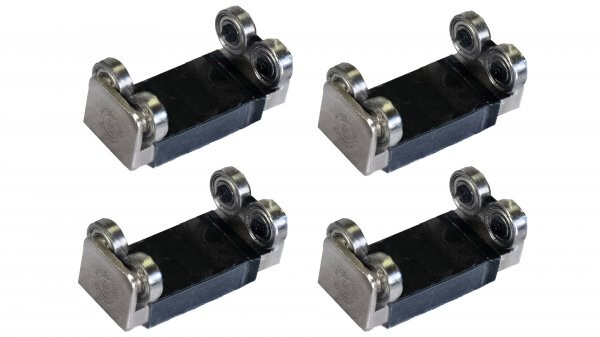
Tom
3 Likes
Paul,
When the locomotive takes off, does the Emergency Stop button on your throttle cause it to stop? Or is your locomotive non-responsive to any command?
Tom
1 Like
I will second that notion. 
Yes, A DB150 can program decoders by writing CVs, however it cannot read them back so it’s more of a spray/pray option. 
1 Like
Especially if one owns a 3D printer–I’ve been planning to make some for my own workbench.
1 Like
Hoooray! I removed the locomotive shell, found the reset button and was able to get back to the factory settings. Richhotrain, that was the trick. Thank you!
After that, the locomotive accepted the change to a 4-digit address and is running great.
Thank you all for the many suggestions and for putting up with my lack of much DCC knowledge. I appreciate your willingness to jump in and help. As a result of this incident and your advice, I will be ditching the DB150 and upgrading to a command station with a separate programming output. I will also be hooking up a computer to use JMRI for future programming.
One wolf, thank you for your very kind offer on the DCS100. Like you, I think I will go with the DCS240+.
Best regards,
Paul
6 Likes
Woohoo! Glad you were able to resolve your issue, Paul. Be sure to turn off dual-mode operation in CV29 so that you don’t experience runaway in the future.
Tom
1 Like
Great news! Congratulations!
When you removed the shell, was there an obstruction holding down the button?
Rich
Thanks for the help, Tom! Will do on CV29!
Rich, there wasn’t anything holding down the reset button. Just had to remove the shell to get to it and have it pressed down when I powered up the programming track. Thanks for solving my problem!
Paul
2 Likes
I was pleased that you were willing to remove the shell. The one thing that I dread about DCC is the occasional need to remove the shell for whatever the reason. I am left wondering if the reset button was simply stuck in the down (On) position.
Rich
Oops! I was wrong.  Never noticed that, even though I have a couple of Paragon 4 engines. Good thing you had the right answer!
2 Likes
Stix, I have to say that even after I persisted in telling the OP to remove the shell and check the decoder, I felt that it might be a waste of time because of your earlier post. I figured that if he had purchased a more recent model there probably wouldn’t be a reset button on the decoder. So, often, this type of thread requires a lot of speculation and a lot of responses to get to the problem and solve it. Kudos to the OP for trying all of our suggestions and sticking with us until the problem was solved. I hate it when a thread ends with no resolution.
Rich