When I was “in DC” , my control panel had a lot of toggle switches, relays, position indicator lights, and, of course the rheostat.
Now that I am in DCC, I can do without any of this because it is all right there on my wireless throttle. So, what does a person put in a new DCC panel? I could duplicate what is on the throttle, but to what end? I am, most of the time, away from the panel area anyhow.
The only panel you may need with DCC is for toggle switches to turn sidings and yard tracks on and off if you have a lot of sound equipped locomotives that you want to park and turn the sound off.
I wired a large HO scale club layout that has six control panels around the room because we have a lot of sidings and yard areas and can run the layout using either DC or DCC. If we didn’t run DC, these panels could be eliminated.
OFC, you don’t have to run everything from the DCC bus. Personally, I think I’m going to hold off on some of the automation, and just use DPDT switches for turnout control.
for the roundhouse, I think I’m going to wire in a few SPST switches to shut the tracks off – not that I need to, mind you… but it’ll help keep me from running an accidentally selected loco over the cliff.
If you are just building your layout for yourself, then having no control panels is OK.
BUT, if you are building your layout to be operated by fellow modelers and friends you invite over, you would be better off having them because they make operating more fun. Otherwise you would have to provide some sheet of information for all the DCC turnout address numbers and where they are located on the layout.
The panels only need the track diagram and switches for controlling the turnouts. I have a separate small panel (about 3 inches by 8 inches) for each town or industrial area where one operator would be working at a time. I use Tortoises, so I also have LED’s on the panels that indicate the direction the turnout is set for. I can also operate the mainline turnouts form the panels and the dispatchers computer or throttle.
So it is really up to you and the type of operations you choose to have.
I am considering small control panels, like your 3" x 8" ones, to hold the DPDT switches and LEDs that are “dual controls” for turnouts also controlled on the “main” control panels. Can you post a photo of one of those smaller control panels?
I’ll let Elmer explain how his are wired, but the easiest thing to do with Tortoises is to simply put the LEDs in series with the motor leads. The Tortoise’s current draw maximum is 18ma, which is well within the safe range of LEDs, so no resistors are needed. Either use 2 lead bicolor LEDs or a pair of whichever colors you like connected back to back. Two bicolor LEDs in serwies witht he Tortoise motor, and one mounted in each leg of the track diagram on the panel will light green fr the selected route and red for the other.
Here’s what I did for a control panel when I used Tortoises:
I drew it in Visio, printed on heavy cardstock in my inkjet printer, and sandwiched the paper between two thin pieces of plexiglas. LEDs are regualr ones wired in series with the motor, yellow for diverging and green for normal. In my case the unselected route was off.
I can think of two uses for control panels in DCC. Some place to install the LEDs that are wired into Tortoise turnout controls and a place for toggle switched for turnout controls rather than operate them from the DCC. A simplified track diagram would be all the graphics needed. They can be small panels located where there are a few turnouts.
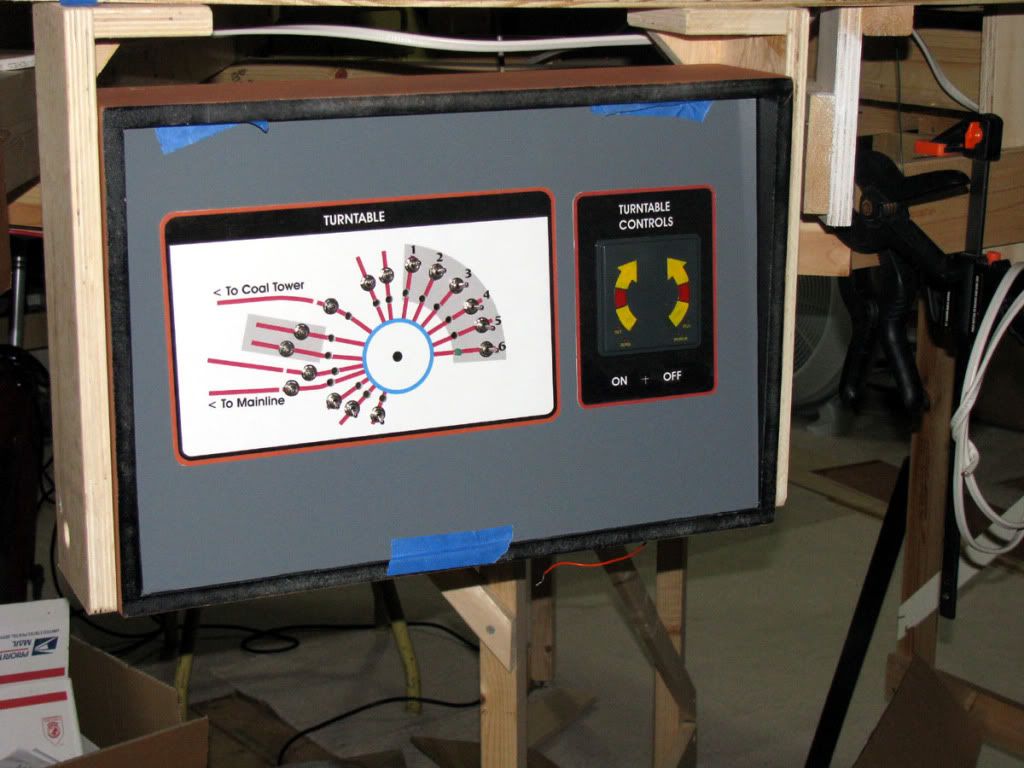
I still use panels with DCC for many reasons already mentioned. Here is one where I don’t think any other method would be as self explanatory. I also have small (4" x 8") panels at various sidings located on the facia. In the photo, I have toggles to turn off power to all lead tracks to the turntable including ones from the yard. There I will have a short (12") segment of track immediatly in front of the turntable, so a loco won’t accidently run into the pit.
Here’s a small control panel on my layout to control the staging area switching. I use pushbuttons, which trigger routes on DS64s. Push a buton and the routes will set all ternouts to get to the desired track.
Here’s a larger control panel that uses DCC via DS64s to control all switching. Routes are used but theya re sent via the throttle. I may go back and add the pushbuttons. The toggle switches are mainly for troubleshooting shorts. I rarely use them.
The two smaller panels are actually just printed on card stock and covered with clear laminate film. I then mount them to the big panel with double sided carpet tape (I couldn’t find 81/2x11 sheets of double sided adhesive film). The big panel is .08" alum with a grey vinyl over it. (My son-in-law owns a sign shop so I can get the vinyl for $00). I used CorelDraw to make the artwork but any good graphics software will work. The worst part is drilling all the holes for the toggle switches and the LED’s.
The main reason I have control panels for a visual representation and turnout control is that I cannot remember the assigned turnout number for DCC control of my 50 turnouts. I suppose I could print a list and carry with me but usually I am close enough to the layout and panel(s), that it is easier to flick a toggle switch or push a button.
 ]
]

