What wireless onboard cameras do you recommend. My old one died on me which is probably good because it blacked out going thru tunnels. I bought a Morse typeS receiver several years ago but I can’t find the camera. Please help!
I’ve been the route on cameras. I wanted a high resolution camera that recorded. I also wanted a WiFi connection that could be used as a view finder.
My plan was to make the camera panable from a flat car that could be either pushed by a locomotive or pulled from say an observation car.
I first tried a MD81S, it took five cameras to get one that worked as advertised. It worked but left a lot to be desired.
Next I went with a Q7 and like the MD81S it took several before I got one that worked correctly.
I had problems with both software programs for the WiFi viewer. Both worked OK in record mode.
My last shot was using a Quelima SQ13. It worked first time, very good WiFi video and excellent recorded video.
If you only want a wireless camera (no record) there are many available that work very good.
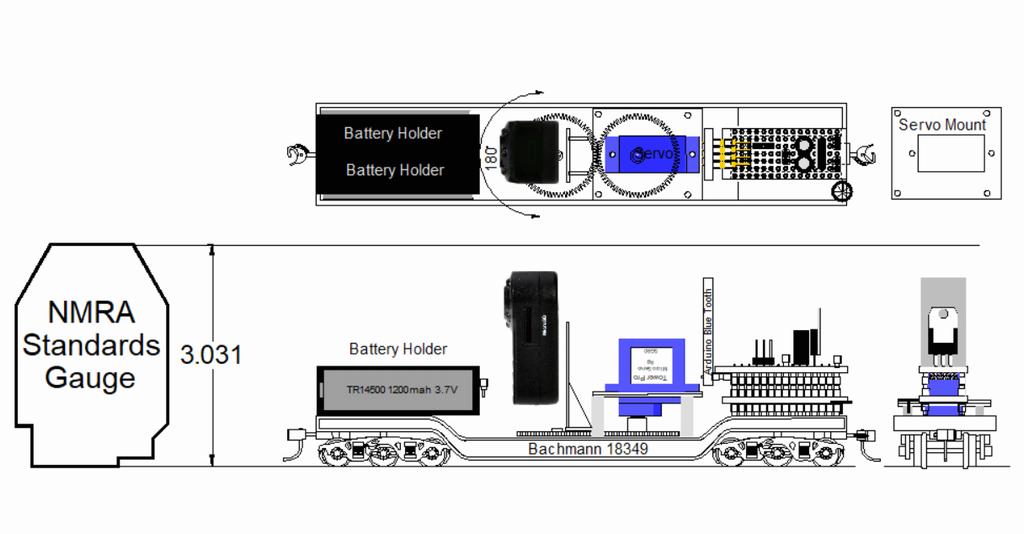
I went with an on board battery to power all of the cameras. A dual 5 volt charger from track power and a pair of 4 volt Lithium AA size batteries in series to power the camera through a 5 volt regulator (USB cable to the camera) all built on a depressed center flat car.
I made the camera mount to pan the camera 180° (actually closer to 160° due to the limitations on the micro servo) controlled from a pair of Arduino NANOs by BlueTooth.
This is my camera car with a Q7 camera.
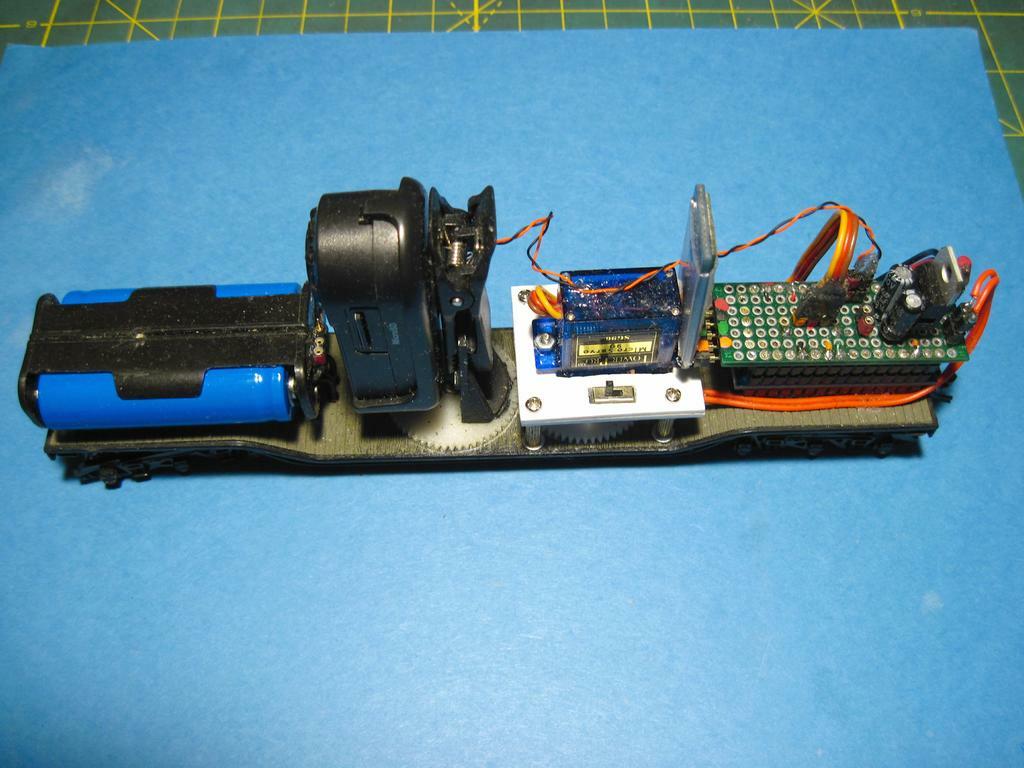
I made the camera mount so that it is easy to remove and install the cameras. They simply plug into the pan mount.
Mel
I just did a Google search for model train cameras. Lots of info out there including wireless.
Some will be dated.
Rich
[quote user=“RR_Mel”]
I’ve been the route on cameras. I wanted a high resolution camera that recorded. I also wanted a WiFi connection that could be used as a view finder.
My plan was to make the camera panable from a flat car that could be either pushed by a locomotive or pulled from say an observation car.
I first tried a MD81S, it took five cameras to get one that worked as advertised. It worked but left a lot to be desired.
Next I went with a Q7 and like the MD81S it took several before I got one that worked correctly.
I had problems with both software programs for the WiFi viewer. Both worked OK in record mode.
My last shot was using a Quelima SQ13. It worked first time, very good WiFi video and excellent recorded video.
If you only want a wireless camera (no record) there are many available that work very good.
I went with an on board battery to power all of the cameras. A dual 5 volt charger from track power and a pair of 4 volt Lithium AA size batteries in series to power the camera through a 5 volt regulator (USB cable to the camera) all built on a depressed center flat car.
I made the camera mount to pan the camera 180° (actually closer to 160° due to the limitations on the micro servo) controlled from a pair of Arduino NANOs by BlueTooth.
This is my camera car with a Q7 camera.
I made the camera mount so that it is easy to remove and install the cameras. They simply plug into the pan mount.
Mel, I hope you don’t mind me butting in.
Robert, here are the dimensions of the SQ13:
Product size (L x W x H): 3.00 x 2.80 x 2.50 cm / 1.18 x 1.1 x 0.98 inches
Here’s one ordering site, but I have no information if this is a good seller or not:
I’ve had really good luck with the SQ13 camera. The MD81S and SQ7 are too big for N gauge.
The recorded video on all three are pretty good quality and is stored on a 32mb micro chip that you can download into your computer with a USB adapter.
I don’t have an N scale NMRA Clearance gauge but pretty sure the SQ13 would fit on a N scale flat car.
All three cameras get between 30 and 45 minutes of video per charge with the WiFi off, with the WiFi on about 20 minutes is all you get off the internal battery.
The camera USB connector is on the bottom of the SQ7 & MD81S and on the side of the SQ13 and the connector might add enough to the size to not clear tunnel portals in N scale. The cameras can be powered through the USB connector from a track powered 5 volt regulator or external battery for extended usage. The smallest USB connectors I’ve found adds a bit over ¼” to ⅜” the size, not a problem in HO.
EDIT:
The SQ13 weighs less than an ounce with the chip installed, .82oz.
Mel
My Model Railroad
http://melvineperry.blogspot.com/
Bakersfield, California
I’m beginning to realize that aging is not for wimps.
Hey everyone . . . I’m the one who should apologize for butting in with my N scale issues.
The dimensions for the SQ13 will fit in the N scale clearance envelope. I also found an SQ11 (and SQ8 and SQ9) which is about 1/8 inch smaller all around compared to the SQ13. But, none of the dimension charts mention whether that is the actual size of the cube camera itself or whether it includes any
I also have a SQ8 that my grandson gave me, he didn’t like the way the camera buttons work. It really works great for me. I used the SQ8 to build up the SQ13 camera mount in my depressed center flat car while I was waiting for delivery of the SQ13. The SQ8 works very good! It doesn’t have WiFI, memory card only.
Mel
My Model Railroad
http://melvineperry.blogspot.com/
Bakersfield, California
I’m beginning to realize that aging is not for wimps.
The SQ series cams are OK if you just want to record for later playback.
If you want realtime views then start looking for one of the drone cameras. Except for power, everything is built-in together on these: camera, controls and transmitter.It’s all mounted on the front of this HOn3 flat car. In the middle is where I bunched uo the excess wiring, then on the rear is a 4.5 volt battery pack.
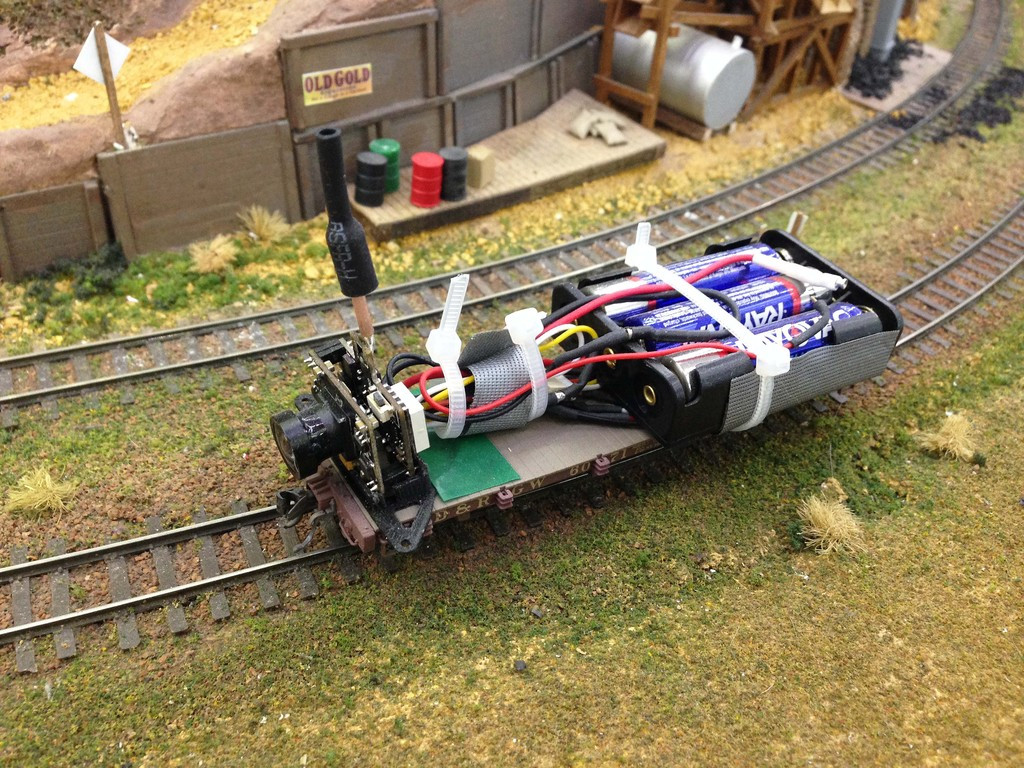
This is the box the camera came in.

I use a eachine LCD5802D DVR/LCD combo to see and record the live video and audio.
This is probably too big for N scale, but is a great size for HO and HOn3.
I thought I would mention the camera lighting in tunnels. The SQ7 through the SQ13 have very good low light level video. I have a camera pusher E7 that I installed 6 super bright LEDs recessed in the front windshield that I control the on/off by DCC decoder and with them on the video is brighter than daylight. The normal LED headlight is more than enough light for the cameras to see the tunnel walls, track and ties.
I made a battery cover for my camera car because the VOF (view of field) sees the top of the on board batteries. I use portion a F7 cab as a battery cover and installed a 3MM Super bright Warm White LED in the headlight and it has plenty of light for the SQ cameras. The video looks like looking out the window over the F7 hood. Kinda blows it though when I pan the camera.
Mel
My Model Railroad
http://melvineperry.blogspot.com/
Bakersfield, California
I’m beginning to realize that aging is not for wimps.
Looks very nice Mike! I like your install!
The SQ7 and SQ13 have WiFi realtime video too. I still record the video on the memory chip and use the WIFi for a view finder to pan the camera.
The WiFi software can be a bugger to keep active but the SQ13 is much better than the earlier cameras. You can control the camera record on and off from the Android View Finder. I use Arduino NANO BlueTooth to control the pan servo.
The battery drain is doubled when the WiFi is in use on the SQ13. The batteries are 1000ma and do pretty good even with out the track power charger.
I’m thinking about ordering an Eachline, I’m always looking for a better way. What softward does it use? The SQ cameras use SYSM Monitor.
Mel
My Model Railroad
http://melvineperry.blogspot.com/
Bakersfield, California
I’m beginning to realize that aging is not for wimps.
I’ve done a little more research, but I am nowhere near up to speed on this topic. The SQ8 through SQ13 cameras all seem to say that they need Windows 2000/ME/XP software. What does that mean? I have Windows 10. Does my system already have drivers, or do I have to search the web and download drivers from some unknown site?
I’m not sure how I will use this new toy. The Wi-Fi bluetooth sort of connection to the laptop (or smartphone) so that I can watch real-time images on the screen might be useful, but if the system only had record, download, and playback functions via a tiny memory chip, that would be okay as well.
At the moment I am leaning towards the SQ11.
Regarding the mini USB connection . . . it looks like the connector is flush with the side of the cube and the additional side dimension for the plug doesn’t come into play if I go with the microchip memory card.
Robert
SYMS Monitor is a free downloadable software and it works in Windows 10.
It can be tedious to get it to work. It works with all of the wireless SQ cameras. I still have some problems getting it to find the camera after several years of dinking with it. It has done well with the SQ13, a real problem with the SQ7 & MD81S, looses the connection constantly.
EDIT:
It works on my RCA Tablet just fine. I use the 7" tablet for the view finder.
Mel
My Model Railroad
http://melvineperry.blogspot.com/
Bakersfield, California
I’m beginning to realize that aging is not for wimps.
I got a Sony HDR-AS20 that I’ve been using to make onboard videos on my layout. Got it off Ebay for around $100 new.
Kevin
I built a camera system that ran in my subway tunnels. It seemed like a good idea at the time, but really? I seldom used it. It ran in real time, with the video transmitted to the TV, or recordable, but why?
Maybe silly in subway tunnels since it’s mostly just blank walls occasionally punctuated by a station, but out on the top of the layout through the scenery? I think it looks good.
I used a specially made car to hold an iPhone back in the day. Phones have gotten too big to fit in HO now, and I no longer have the phone the car was maade to fit, so that’s useless. Time to make one. I think I would use a single li-po cell and a boost converter to get 5V, more efficient than a 5V linear regulator. I wonder how long your batteries would last Mel, if you wired them in parallel instead of series and ditched the 5V linear regulator for a cheap little boost converter to get 5V out of the 3.7V lithium battery.
–Randy
I like that idea Randy!
In my case I could try a regular buck converter and a TP4056 to charge the battery from track power instead of the two cell 12 volt battery charger board.

A TP4056 will charge the batteries at 600ma with the proper resistor.
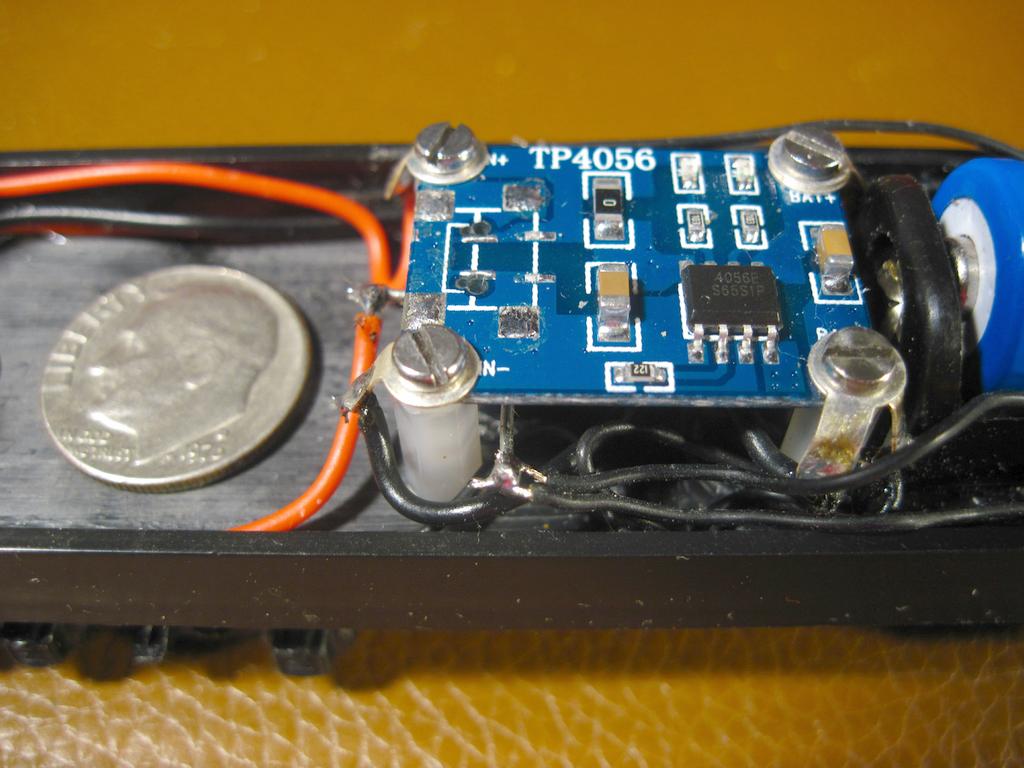
. . . . . After thinking about it I decided to stick with “if it ain’t broke don’t fix it”. I do like your idea!!! Should have done it your way in the first place, my bad.
The biggest hit on the batteries is the servo not the camera, the servo draws 90ma to 110ma when positioning the camera. The camera draws a bit over 45ma with the WiFi on, 20ma with it off.
I forgot the NANO and BlueTooth, that’s another 90ma. I built my camera car three years ago and my foggy 83 year old brain is kinda slow.
The car does work very good as is. The two cell charging board only comes on momentarily at 300ma per battery and only draws 680ma from track power for less than a minute.
Mel
<
I don’t have a camera, but I watched a video of John Peluso’s Frisco Eastern Division, https://mrr.trains.com/issues/2020/june-2020, and I was fascinated:
So which is the best camera to mount on a flat car for HO scale? I don’t want to build one, and if I can get one with hi-resolution that would be great!
I would recommend the SQ8 for just pushing around on a flat car. It will record for a bit over 30 minutes on a charge. The video is pretty darn good.
It comes with a USB cable to download the video or you can use a SD Card USB adapter and plug it into a USB port on your computer.
The Field of View is pretty wide and will show the flat car so mounting it a bit elevated on the flat car will help get rid of the flat car.
Mounting the camera toward the back of the flat car will show a lot of the car on the bottom of the video but then the locomotive headlight helps in tunnels or darkened areas.
I’ve used an SQ8 by just sticking it to a flat car for three years and it’s very impressive video.
Mel
My Model Railroad
http://melvineperry.blogspot.com/
Bakersfield, California
I’m beginning to realize that aging is not for wimps.