Great list…thanks.
I have templates for this very exact reason. Do know they are in MS Works, not MS Excel. I highly recommend if you are able, use Works. It is much more suited to this very exacting task than Excel. I have used this method for decades. It is highly adaptable, changeable, and efficient. If your stuck with Apple, then disregard this post, I cant help you there.
I dont mind sharing my templates, but I think they may be more than what you need. Besides, only YOU know what YOU want to keep track of in your own files. I track almost 50 items of data per model. You might only want to keep a log of 10 items of info for your models. So that part is really up to you.
You mentioned yourself - ‘road numbers’. That’s one field of info right there. I bet you can think of others that would make each model uniquely identifiable to you. How about road number AND ‘road name’, car type, manufacturer, when and where and for how much did you buy it, and definately add a ‘notes’ column. That is an valuable field of info to track in inventory programs.
Once youve made your template, saved it, MADE A BACK UP COPY(!), you should copy it to your cell phone. When at a show, swap, or shop… just pull it up and verify if you already have the car or not.
One more thing that most folks dont know… your inventory sheet can be used by your home insurance provider for assessments should something happen to your collection. Pictures are a perfect item to combine with the inventory info. This should give you some thought towards the info you want to add to your spreadsheet.
Using Access here too. Set it up for how I needed it and have stayed with it for 14 years. Not as easy to make errors with it as with excel I find ( accidentally deleting info ) I can export the info I have to excel if I want to.
I, too, use MS Access, but if you don’t already own it, it is too expensive to buy for just this one task.
I use Excel, and in addition to the fields mentioned, I also use:
Running (or operational), meaning - can the car be used in operations, or is it part of my unbuilt kit collection? Enter 1 for running, 0 for not ready.
I calculated the approximate number of the different types of cars I need for operations, to identify what I should be looking to acquire, and those where the inventory is sufficient.
Jim
Thanks for the Link to Dallas Model Works. Their online Railroad Apps look to be very useful and a source of great ideas for what I want to do!
I use an Excel template which my daughter created, and it contains folders for various types of equipment, such as Locomotives, Home road freight cars, Interchange freight cars, Non-revenue equipment, Passenger Equipment, etc., etc.
The number of categories is unlimited, as are the number and size of both the rows and the columns. I include reporting marks and car numbers, car type, length, manufacturer, modified or not, value, and include whatever comments apply to each item. Because I’ve sold a lot of home road (freelance equipment) over the years, I also keep track of those cars and locos - reporting marks and numbers - so that I don’t inadvertently number a new item for a number already belonging to someone else (simply a matter of respect for anyone who liked my work enough to buy it). Sold items within the list have a coloured background to differentiate them from what’s still in my possession.
The programme will sort the items as you wish - mine are alphabetically by reporting marks and numerically within each similar group. You can add items as they’re acquired, in their proper order, and each folder can be customised as to the categories, number and size of columns, etc. I’m sure that there are lots of other things it can do, too, but for me, the important thing is that it does what I need and it’s simple to use - if it’s simple for me, it should be simple for anybody. [swg]
Wayne
Another vote for Excel. My columns are car type, road name, road number and color. Then, I’ve got a few extra columns that I put micellaneous stuff in, like whether it’s a high-wheel boxcar, or whether it’s an unbuilt kit still in the box. I try to put kits in as soon as I get them, because a primary use of the spreadsheet is to sort by road number and then use it to avoid buying duplicates at train shows.
I use a separate sheet for locomotives, which contains mostly decoder information. It’s a convenient place to keep a record of CVs.
I use Excel but I dont get into as much info as tstage. Very basic w/car type including abbreviation, rad name and number.
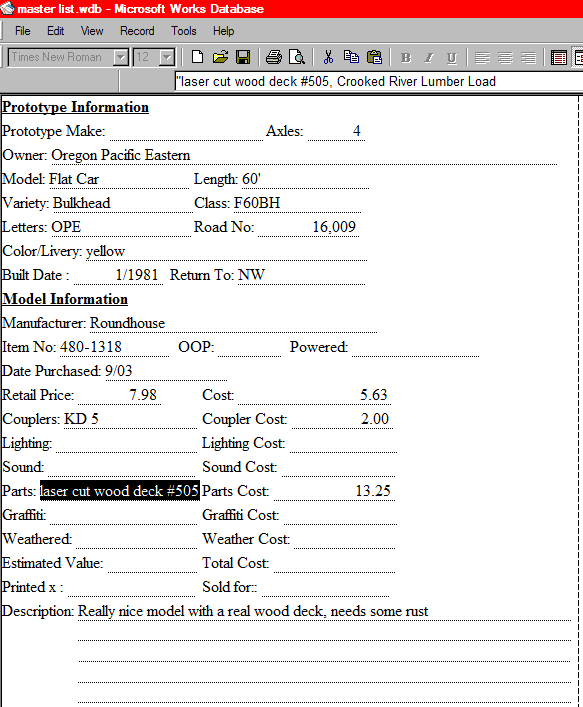
I created my own database for Mircosoft Works since it comes free with almost every new computer if you get the home bundle instead of the office bundle.
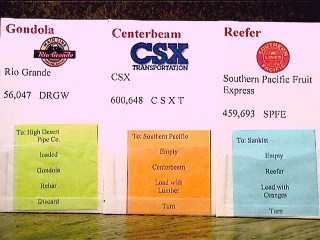
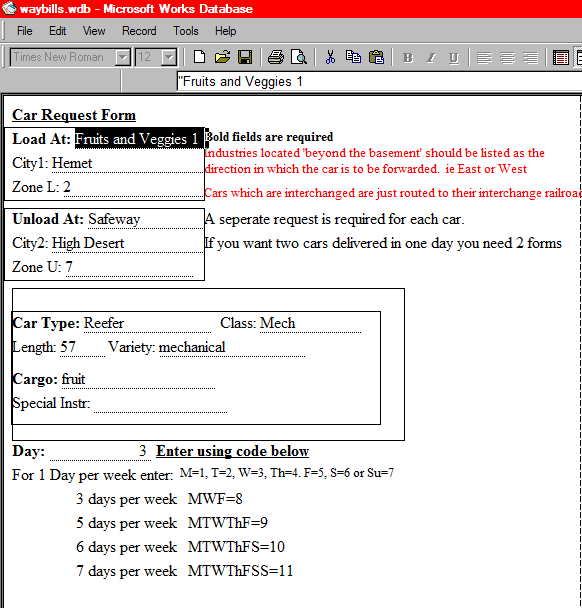
I have fields for everything imagined. And it’s easy to add more fields. I also made car cards to match which use the address merge feature to insert the car information onto the cards for printing car cards for operation. Also prints out my waybills.
Locomotives and rolling stock share one database. Figures, structures, vehicles, and books/magazines all get their own separate databases. All can be used for insurance.
This is an old picture, the new version also includes fields for the name and address where purchased, Date Sold.
Here’s a screenshot of a portion of my Excel-based inventory:

The page seen here is considerably longer than what’s visible, and, as you can see at the bottom, there are tabs for other types of items, such as locomotives, passenger equipment, etc. Column width and height are whatever you set them at, and the number of them is unlimited.
Wayne
Lone,
How did you make the car card sheet? Using them would make train operations much more realistic.
~Lee
Great idea w/ the Excel databases and taking them to train shows. Having a handy guide makes sense, but given that I have only 35 freight cars, it’s highly unlikely I can find duplicates.
~Lee
The car cards are printed on 3x5 note cards. Then I cut up ziplock baggies into 3x2 pieces and tape the plastic onto the cards to make the pockets for the waybills.
I use a separate database for my industries which send and receive shipments via rail to print the waybills. I use a seven day system so I can have variety and it allows me to have ‘seasonal’ freight in varying amounts on different days. I use colored paper to represent the different days.
I use a #2 Dixon Ticonderoga pencil and sheets of college ruled notebook paper to list my model railroad rolling stock. The boxcars are sorted alphabetically by reporting marks. All other cars are sorted by type. I have a separate section for cars run on my club layout. All is kept in a 3 ring binder.
Excel is easy to use and portable. You can shove it up on google docs and take it with you. I can also append custom data columns to each tab. For example i have a sheet for.kits percent complete.notes and paint.colors.used. on my steam trains.sheet i have manufacturer decoder model notes and home stall and estimated value as well as maintenence notes wheel configuration and engine class and number. On my passenger cars tab i have a car name or number and maintenece notes.colors.etc. Now i have a another tab that allows.me.to.build trains and when you hit the generate way.cards it dynamically generates way.bill.cards for a running session and.printing out.
I too use Excel (actually Libre Office’s version of it). And, like Wayne, I have tabs for each of my rolling inventory types (Locomotives, Boxcars, Gondolas, etc.). Mine is rather basic, I have columns for road name (or reporting marks), road number, description (e. g. 40 ft. single door boxcar), manufacturer and model number. I also have a last column for quantity, so that, when I add more to the list, all I need to do is add up the column so that I know how many locomotives, boxcars, etc. that I have. I am presently quite behind on updating the inventory, as I have acquired many new pieces over the last few years and have been busy spending my limited hobby time working on my layout. I only keep inventory on my rolling stock and motive power at this time, but adding the structures and accessories is only a matter of adding a new worksheet to the existing workbook.
Here’s what’s in my inventory file - Excel 2013
Manufacturer
Manufacturer#
Brand/Series
Car Type
Road Name
Road#
Car Description
Color
Truck Type
Coupler Type
Weathered
Scale
Bought at
Price
Have fun!
Dan
I also use Easy Model Railroad Inventory. It is free and has more bells and whistles than I will ever use. Not only can you list your equipment, but also your library. I didn’t realize I had so much stuff and I am not even finished listing.
Ken