I’m just an average guy with an average brain. Not a technical engineer by any means. But these sound slots and volume cv’s with a ESU LokSound 5 decoder really has me frustrated. What is a sound slot and how do you use it? To change sound volumes you have to enter “index” cv 31 to 16 and “index” cv 32 to 1. Does that mean to just enter the regular number 31 with a value of 16 and the same with cv 32? And then enter the cv 275 and then the value? All this is after I find sound slot 3 wherever that is.
Sorry for the rambling on but I’m a 73 year old guy just trying have fun with my trains
Sounds slots are the “tracks” - like a record. Sound slot 1 might be the prime mover, sound slot 2 might be the horn, sound slot 3 the bell, sound slot 4 the dynamic brake, etc. Mainly this is only a concern if developing your own sound projects - and frankly I have neither the time, the equipment, or the access to real trains to do such a thing.
Indexed CVs are exactly as you say. The index allows one CV, in your example CV 275, to do more than one thing (because if every setting had its own CV, there’s be over 4000 CVs, and most DCC systems can’t access something like CV3042. SO you set the index CVs to the values specified, and then set the actual CV.
It’s kind of like having a bunch of drawers, each with a number (you are in drawer 275). Inside drawer 275, there are those dividers like in those little tackle boxes everyone uses to store small parts. The index CVs tell you which of those little cubbies you are putting something. So drawer 275 might have 20 sections, the index tells you which particular section you are accessing.
Use JMRI/DecoderPro. It’s point-and-click in plain language on your computer screen. You don’t have to understand indexed CV’s, or bits or bytes, or…
And it’s timely, as the guy who writes the LokSound definitions just made major updates for the ESU V5 decoders.
If you managed to get onto this forum and post, you can handle installing JMRI. Lots of good tutorials around, and the JMRI User’s list is a great place to get help - The folks who actually write it (including the guy mentioned above) frequent that list:
I think this is the relevant page for the OP to change the volume of the horn
It looks to me that the actual sound slot is an unnecessary and confusing term that is of no help to the newbie. If you have a car with a stick shift, you need to know when 3rd gear is. You don’t need to know the gear ratios in the tranny unless you are building a race car.
It looks to me, once he sets the index CV’s properly, it’s just a matter of trying different values into CV 275 to get the volume he wants.
I share the original poster’s pain. I finally gave up trying to change anything.
After reading these responses, I see that it is time that I get JMRI. I have not done it yet because I didn’t know that with my NCE, I need to purchase a USB connection to get to my laptop.
I really appreciate this forum and appreciate you experienced modelers who take the time to help people like me. You may not hear it often, but I really do thank you for your help!
Normally I’m a tech guy. I built my last desktop computer just a couple years ago, but I have no inclination to learn JMRI. I do have a lokprogramer but I don’t use it as much as I could. We are only talking about changing 3 CV’s. I can do that quicker than I could type this post.
Unfortunately, Henry, the Sound Slot is an important part of the ESU Sound file structure. Unfortunate, too, is that ESU doesn’t make it easy to understand.
Each “sound project” i.e. the particular locomotive “sounds” that you want occupy different sounds in the various “slots” or tracks as Randy explains.
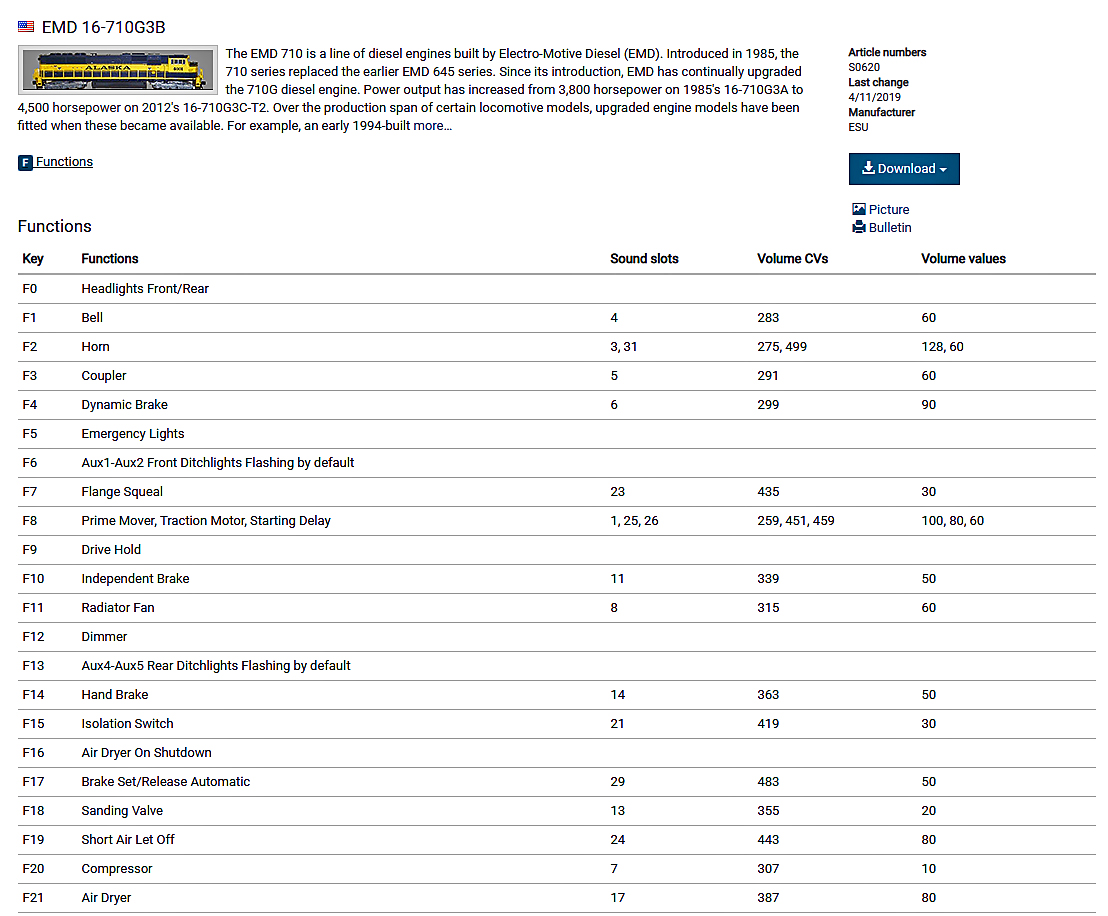
You have to look up the “sound project” that is loaded onto the decoder, then refer to the listing here to know the exact configuration (default) of that sound project:
As I mentioned in my earlier reply you can see the (F2) horn and bell are together in one function, thus both sounds “play” when that function is pressed.
Yes, JMRI has much improved ESU capabilities in more recent releases. The Lokprogrammer, once you get the knack of using it, is even easier to make changes or customize your decoder operation.
Well thanks to everyone for the helpful comments. I briefly visited the JMRI website and didn’t want to get in over my head. I think I should revist it and jump in with both feet.
I do know that if I need another sound decoder it will be another Soundtraxx tsunami 2.
You can download JMRI and play around with Decoder Pro without having a DCC/USB interface. At least it will give you some feel for what’s there and how things fit together.
IF you don’t already have JAVA installed on your machine you should download that first. Then do the JMRI install.
I use Decoder Pro all the time and I’ll bet I only use about 20% of all the features, maybe less. Once you get the hang of the roster section of the program you’ll see how nice it is to have a record of your locomotives, what decoder is in them and any other notes you want to make and save.
In the chart in Ed’s example, you’ll see that there are two numbers in the ‘sound slot’ column for Function Key F2 (“3,31”). That means that there are two sounds occupying that ‘slot’, so when you press F2, both sounds will come on. In another part of the LokProgrammer set-up, you can assign non-sound functions to the the F keys, so you could have say the ditch lights come on when you press F2, along with the horn and bell sounds.
I’ve tried using DecoderPro with ESU decoders, but not had great luck getting it to read everything correctly. I finally bit the bullet and bought a LokProgrammer, and it does make things a lot easier to understand. ESU sound decoders have hundreds (thousands?) of possible options, and without a LokProgrammer getting things set up the way you want just by entering CVs manually is pretty hard.
I mentioned it in the other thread about the horn/bell conundrum, sorry — I’m getting the threads mixed up.
My screen-grab is only part of the CV/function/sound slot list. The horn and bell type selection are part of the prime-mover sound project found at the link I provided above.
Here is the horn selection:
Recorded from a EMD SD70MAC
File also contains an “Isolation Switch” Mode on F15 when Standing Still.
Pressing F15 while not moving will lower the prime mover to a “Low Idle” and lock the motor. F15 must be turned off to begin moving.
I think that if you look at the previous posts, you will see that for those of us new to all of this, it seems like rocket science.
I think I will study a while, and then I might decide it is just not going to happen for me. I will be content with the horn button on the NCE controller.
As I understand it, ESU decoders have so many options that to work them all in they have to have hundreds of CVs - many more than a typical decoder uses, and so many more than most non-ESU DCC systems / programmers can read or change.
So yes, to access and change the value of CV 275 you would need to first program CV 31 to a value of 16, then CV 32 to 1. That sort of ‘shifts gears’ to the higher CVs, so you then can program CV 275.
If you then wanted to change say CV 276, you’d have to do the same process with CV31 and CV 32 again before changing CV 276.
BTW the LokProgrammer software is a free download. Seeing it might make it easier to understand, even if you can’t use it program without the LokPrommer hardware. For example, I believe you can load the software with the sound project that your engine uses, make the changes that you want, and then review the list of CVs to see what CVs need to be reprogrammed to get the same result.
In JMRI, the V5 definition/roster entry has 2035 CVs and 9895 Variables. (A V4 definition/roster entry has “only” 1016 CVs and 4410 Variables.) There are also roughly 60 CV’s/variables that JMRI doesn’t (yet) read. Which slot is used for which sound can also vary, depending on the sound project in question.
So do I really want to keep track of all that just to lower or raise the volume of one sound? Or even use the LokProgrammer software to “figure out”
I really appreciate all great comments and suggestions. I think the light in my head was finally turned on. A lot of issues were cleared up. I did download JMRI and watched several videos about it. Still need to get the usb interface.
Well, one plus is you can update the firmware and/or the sound files to your Loksound decoders anytime you want - i.e. if you have a Loksound decoder to update. Since Loksound is one of my two go-to sound decoders, the LokProgrammer is worth the investment for me. If Loksound isn’t one of your preferred sound decoders then - yea, why would you by it?
LokProgrammer doesn’t replace JMRI, Steve; it’s just a different resource.
I’m aware that the LokProgrammer (or more accurately, the LokProgrammer software) isn’t a replacement for JMRI.
But all the OP wanted to do was change the volume.
He also mentioned that if he ever needs another sound decoder it will be “another Soundtraxx tsunami 2” (emphasis added), so we have to assume he already has at least one. And, that statement also makes me think ESU might not be his “go-to” sound decoder any time soon.
With all that in mind, I still think JMRI and an interface device that works with his DCC system is a better choice for the OP.
No idea what the F = true statements mean, but when you click on each horn on the right, the left side of the screen populates with information on that horn.
Edit; There is a hole in my knowledge here. When I go to the radio Decoder button, Sound Slot 3 is horn pack 1. The preview, sounds exactly the same, no matter which horn I choose.